Understanding your billing cycle, invoices, and automated reminders
At Ceylon Servers, we aim for transparency in our billing process. This guide will help you understand how and when you are billed for your services.
1. What is a Billing Cycle?
Your billing cycle refers to the interval of time between your invoices. Depending on the plan you chose during checkout, your cycle could be:
- Annually: Invoiced once every year (often includes a discount).
2. How to Access Your Invoices
You can view, print, or download your invoices at any time through the client portal:
- Log in to your Ceylon Servers Client Dashboard.
- On the main dashboard, click on the "Billing" menu and select "My Invoices".
- Here, you will see a list of all Paid, Unpaid, and Cancelled invoices.
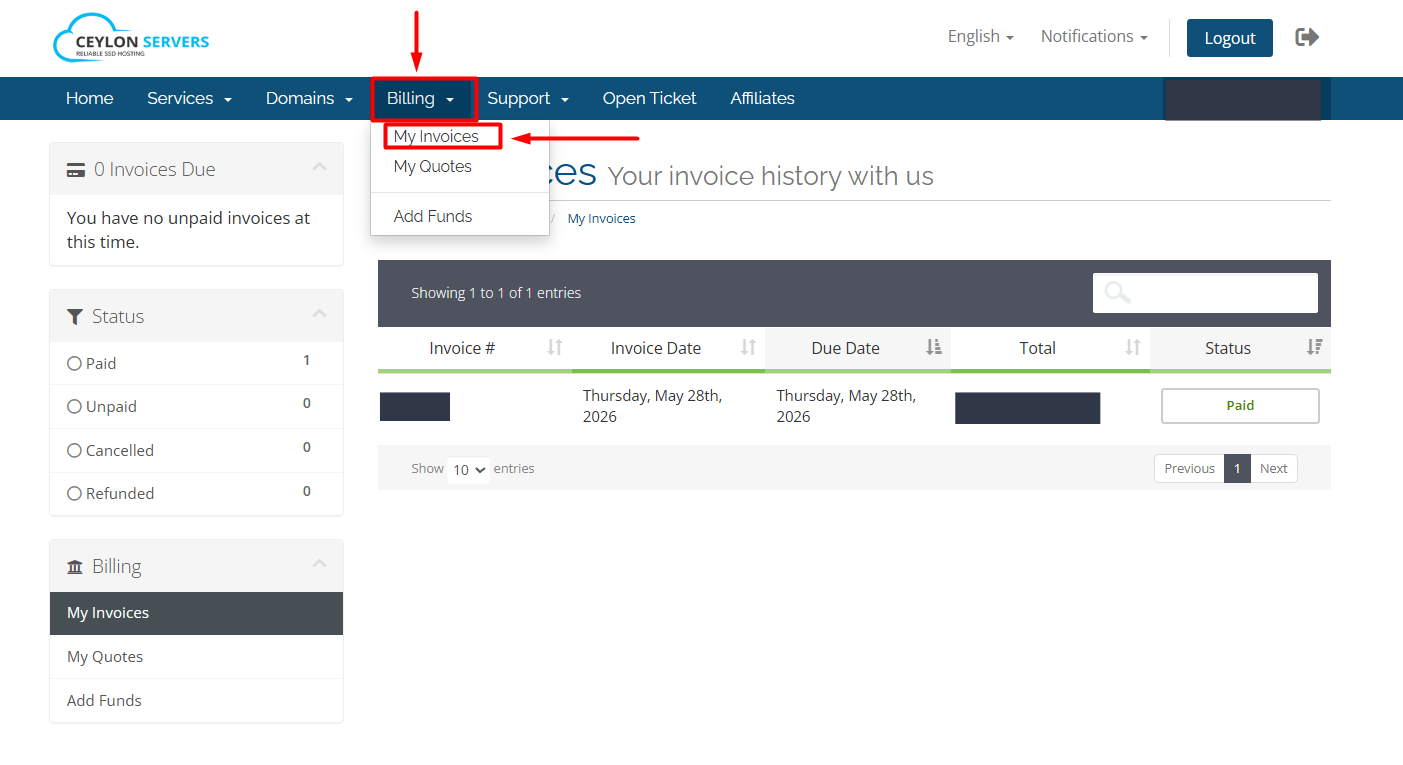
Click on any invoice to view the details or download it as a PDF for your records.
3. Automated Reminders
To ensure your website never goes offline due to a missed payment, our system sends automated notifications to your registered email address:
- Invoice Created Notice: Sent as soon as a new invoice is generated (usually 7 days before the due date).
- Upcoming Payment Reminder: Sent a few days before the due date as a friendly nudge.
- Overdue Notice: Sent if the payment is not received by the due date.
- Service Suspension Notice: If an invoice remains unpaid after the grace period, the service may be automatically suspended to prevent further charges.
4. Payment Methods Accepted
To make settling your invoices easy, we accept a variety of payment options:
- Credit/Debit Cards: Secure online payments via our portal.
- Bank Transfers: Local bank transfer options for Sri Lankan clients.
- Online Wallets: Supported local and international payment gateways.
Best Practices for Billing
- Keep your Email Updated: Ensure your primary email is active so you never miss a reminder.
- Check "Spam" Folders: Occasionally, automated billing emails may land in spam; mark them as "Not Spam" to stay informed.
- Advance Payments: You can add funds to your account credit if you wish to prepay for your services.
Need Help with an Invoice? If you have questions about a specific charge or need to change your billing cycle, please open a Billing Ticket from your dashboard.